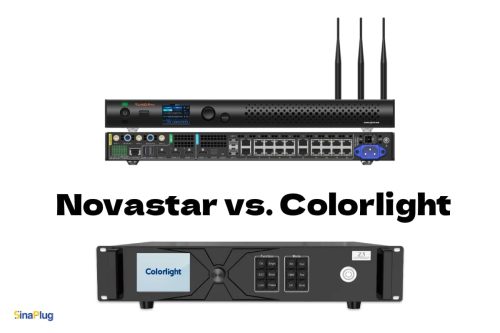

Novastar and Colorlight controllers are two major players in the LED display industry, each with strengths that can significantly impact your next project. Whether you’re setting up a large stadium screen or a modern retail display, choosing the right controller involves more than just comparing specifications; it’s about aligning reliability, ease of use, and budget with your practical requirements.
Those who have worked with both brands know that although they have many similarities, the differences become particularly evident in demanding setups.
Let’s explore more details about these two powerful controllers.
What Are LED System Controllers Anyway?
Before we dive into the comparison, let’s establish some key points. LED system controllers are the brains behind your display; they manage signal processing, content scaling, color correction, and synchronization across large pixel arrays. You can think of them as the directors of a blockbuster movie: they take raw footage from sources like HDMI or DVI inputs and transform it into a seamless, vibrant show on the screen.
NovaStar, based in Shenzhen, has built a reputation for broadcast-grade precision since the early 2010s. Meanwhile, Colorlight, another prominent Chinese brand, has carved out a niche by offering affordable and user-friendly equipment that is widely used in both rental stages and fixed installations.
Both companies support high refresh rates and multi-card cascading, but their approaches differ: NovaStar focuses on achieving perfection for professionals, while Colorlight provides solid performance at a more accessible price point.
Core Differences Between Novastar & Colorlight
NovaStar stands out for its impressive raw power. Their systems feature ultra-low latency (often under one frame) and come with Genlock for perfect synchronization during live broadcasts or events. You can push 8K at 60Hz or more, featuring 20-bit grayscale for exceptional color depth that makes fine-pitch LEDs vibrant.
With fiber optic redundancy, signals can travel over 10 kilometers without interruptions, and their systems are designed to endure extreme temperatures from -40°C to +80°C. This reliability is why you’ll find NovaStar technology on NBA jumbotrons and concert rigs, where downtime is simply not an option.
On the other hand, Colorlight counters with innovative processing techniques. Their Infi-bit grayscale and Picture Engine 2.0 provide smooth visuals, even on budget panels. Refresh rates can reach up to 3840Hz, and they offer strong HDR support on their flagship models.
What sets Colorlight apart is its versatility: features like asynchronous playback for standalone screens, mobile apps for quick adjustments, and per-pixel calibration prove invaluable for irregular shapes. Additionally, their systems are more affordable, making them ideal for scaling up without breaking the bank.
Both brands use sending and receiving card combinations; however, NovaStar’s V-CAN and NovaLCT software are more refined for handling complex configurations. In contrast, Colorlight’s iSet and LEDVISION excel in plug-and-play simplicity.
Comparison Table of Novastar & Colorlight
Here’s a clear comparison that gets straight to the point.
| Aspect | NovaStar | Colorlight |
| Max Refresh Rate | Up to 7680Hz | 1920-3840Hz |
| Latency | <1 frame, Genlock support | Ultra-low,dynamic enhancements |
| Resolution Support | 8K@60Hz, 20-bit grayscale | 4K HDR on high-end, 16-bit |
| Key Software | V-CAN/NovaLCT (intuitive UI) | iSet/LEDVISION (mobile-friendly) |
| Redundancy | Dual cards, fiber backup | Basic backup, strong async |
| Best For | Broadcasts, large venues | Rentals, commercials |
| Price Range (est.) | Higher end ($500+) | Budget-friendly ($200+) |
NovaStar’s redundancy and high-end specifications justify the cost for critical jobs, while Colorlight’s calibration tools often excel in creative installations.
When to Pick NovaStar LED System Controller

Imagine you’re setting up a 360-degree LED cylinder for a trade show keynote presentation. For this task, NovaStar is the ideal choice. Their products, like the VX1000 model or the MCTRL series, can handle over 10 million pixels effortlessly and offer 16-bit color correction, which ensures smooth gradients on curved surfaces.
The Colorlight system can encounter issues during operation due to excessive heat. However, switching to NovaStar can ensure seamless performance even in heatwaves. Additionally, with a global network of 37 branches, NovaStar provides fast firmware updates and technical support.
If your venue includes live switching between cameras, replays, and graphics, NovaStar’s low-latency mosaic and scaler technology guarantees that everything stays frame-accurate. While this might be overkill for smaller screens, for any professional-grade setup, it’s worth every penny.
When to Pick Colorlight LED System Controller

If you’re outfitting 20 retail storefronts with asynchronous video walls, Colorlight is the leading choice. Their 5A-series receivers synchronize multiple screens using Ethernet, and the LED Cloud app allows you to push playlists directly from your phone, no laptop required. You can use their Z-series for pop-up events, and you will surprisingly see that the setup will take only 30 minutes.
The dynamic brightness adjustment performs exceptionally well under varying store lighting conditions.
For rentals or fine-pitch displays, such as P2 or P1.5, Colorlight’s pixel-level mapping can save you hours of setup time. While it may not be as robust as NovaStar in extreme conditions, it is more than sufficient for 90% of commercial gigs, and your budget will appreciate it.
Common Pitfalls and Pro Tips
Avoid relying solely on specifications written on paper. If you mismatch a controller with your cabinet’s scan mode or grayscale requirements, you’ll likely encounter issues such as ghosting or color shifts. Always verify the compatibility of the receiving card. NovaStar’s Taurus series is best paired with their own senders, while Colorlight systems tend to work well with third-party options.
Pro Tip: Begin by considering pixel count and input types. For less than 1 million pixels, Colorlight’s asynchronous configuration might be sufficient. For more than 5 million pixels or live video applications, opt for NovaStar. Additionally, test refresh rates within your software; remember that a higher refresh rate isn’t always better if your source can’t keep pace.
Why Choose SinaPlug for Your Controllers?
At the end of the day, finding the right gear shouldn’t be a hassle. That’s where SinaPlug comes in. We are powered by AzarPixel and offer the best options for ordering both NovaStar and Colorlight controllers. We stock a full range of products at competitive prices, with fast global shipping that helps you get your project up and running quickly.
What sets us apart? Our expert technicians! They will gladly hop on a call to review your screen specifications, venue layout, and objectives, then recommend the perfect solution: NovaStar for unparalleled reliability or Colorlight for smart value. No guesswork, no returns, just plug-and-play success. We have helped hundreds of clients avoid costly mismatches, from Dallas to stages in Los Angeles. Contact us today!