
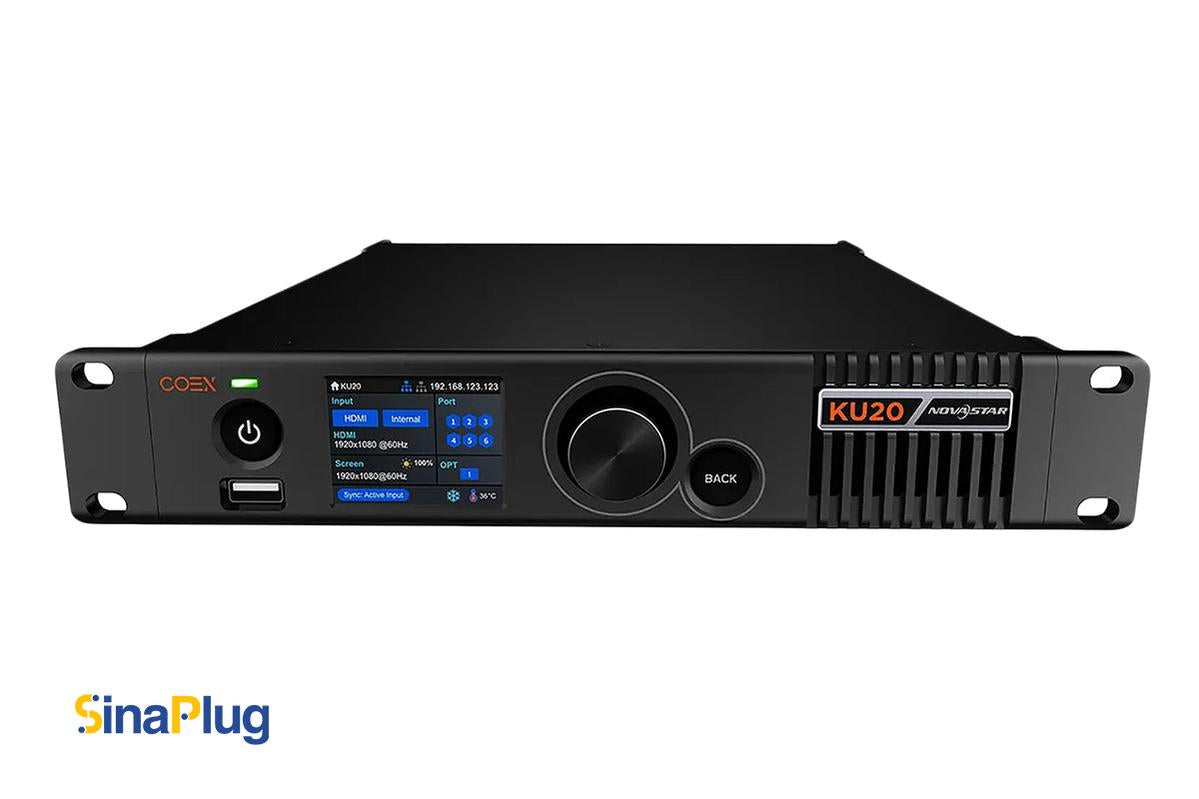
For maximum precision and speed, nothing beats the Norstar COEX settings.For LED technicians seeking quality and freedom, the KU20, MX20, and MX30 all offer adjustable power settings. Displaying on a tiny screen within or a massive 4K LED display outdoors, these tools provide the speed, control, and clarity you require.
Understanding the COEX Series
The COEX series by NovaStar is designed to make LED control smarter and simpler. Each model combines powerful processing with intuitive software. You can control small retail displays or synchronize massive screens across a concert venue, all from one system.
Sinaplug is happy to offer the MX20, MX30, and KU20. These controllers help businesses and AV professionals pick the best one for their LED setup. Let’s look at how well each of these devices works for you.
KU20, Compact and Smart
The KU20 is one of NovaStar’s most popular models. It’s compact, reliable, and perfect for smaller LED display projects.
This controller can be used in both All-In-One and Send-Only modes. It can easily handle both creative and standard LED displays thanks to its loading capacity of 3.9 million pixels. The HDMI 1.3 input can handle up to 1920×1200@60Hz, and the 6 Gigabit Ethernet ports and 10G optical output make sure that data is sent quickly and reliably.
The KU20 offers low latency (under 1ms) and pixel-level brightness and chroma correction for smooth, accurate visuals. It supports A10s Pro and Armor (AXs) series receiving cards, which allow you to build non-rectangular, artistic LED screens with no wasted capacity.
With NovaStar’s VMP software, users can adjust brightness, gamma, and color temperature quickly, and save up to 128 presets for instant recall.
If you need a cost-effective controller for retail, indoor displays, or smaller event setups, the KU20 is the perfect start.
MX20, Professional and Versatile
The MX20 brings more power and flexibility. It combines controller and processor functions for professional-grade LED systems.
It supports 3.9 million pixels but adds advanced image processing with Image Booster 2.0 and Dynamic Booster for rich color and detail. Dual HDMI 1.3 inputs, 3G-SDI input, and two 10G optical ports make it easy to manage complex installations.
You also get Genlock synchronization, which keeps multiple screens perfectly in sync—essential for broadcast and live events.

The MX20 supports 8-bit and 10-bit inputs, full grayscale calibration, and low latency operation. When paired with the A10s Pro, it reaches new levels of color accuracy and adaptive frame control.
It’s fully compatible with VMP software, which allows monitoring, managing, and cascading up to 20 units effortlessly. The MX20 is ideal for corporate events, E-sports, studios, and fine-pitch LED installations.
MX30, The Flagship Controller
From the COEX family, the MX30 is the most powerful. It is powerful and accurate, and it was made for big LED displays.
It features 10 Gigabit Ethernet ports, two 10G optical ports, and multiple input options including HDMI 2.0, HDMI 1.4, DisplayPort, and dual 3G-SDI. It supports up to 6.5 million pixels and 4K×2K@60Hz resolution.
When paired with A10s Pro receiving cards, the MX30 enables HDR10, HLG, full grayscale calibration, and frame-rate adaptive output for cinema-level visuals.
The GENLOCK IN-LOOP sync ensures that every screen in your setup runs flawlessly in real time. The MX30 can cascade through Ethernet, HDMI, SDI, and optical links, making it perfect for concerts, live events, broadcast studios, and sports arenas.
Its VMP software integration gives you precise control, easy monitoring, and smart device management. Every layer, brightness level, and gamma setting can be adjusted or saved as a preset.

Performance and Connectivity Comparison
| Feature | KU20 | MX20 | MX30 |
| Max Pixels | 3.9M | 3.9M | 6.5M |
| Input Ports | HDMI 1.3 | 2× HDMI 1.3, 1× 3G-SDI | HDMI 2.0, HDMI 1.4, DP, 2× 3G-SDI |
| Output Ports | 6× Ethernet, 1× 10G Optical | 6× Ethernet, 2× 10G Optical | 10× Ethernet, 2× 10G Optical |
| HDR Support | ✗ | ✗ | ✅ HDR10, HLG |
| Latency | <1 ms | <1 ms | <1 ms |
| Ideal For | Retail, Indoor | Studios, Corporate | Concerts, Stadiums |
This quick comparison helps narrow down your choice depending on your project’s complexity and visual demand.
Practical Applications
- KU20, Perfect for small to medium installations. Retail displays, church screens, or small-venue LED signs.
- MX20, Ideal for professional productions. Use it in control rooms, broadcasting, or mid-scale event setups.
- MX30, Built for big moments. Large-venue concerts, sports stadiums, and live broadcast studios.
Each controller adapts seamlessly to NovaStar’s Armor (AXs) series cards, ensuring performance and reliability even under heavy use.
Why Choose Sinaplug
Sina plug partners with NovaStar to deliver high-quality LED control solutions across industries. We help customers find the right tools—whether you’re managing an LED wall in a retail store or designing a large broadcast studio.
Our team ensures you get authentic products, technical guidance, and after-sales support so your installation performs at its best.
Final Thoughts
Power Your Display with Confidence
NovaStar’s COEX line can be used for LED projects of all sizes, as shown by the KU20, MX20, and MX30 models. There is a type for everyone, whether you need something small, professional, or high-end.
No matter which model you pick, you will get reliable speed, smart control, and advanced image processing.
Ready to upgrade your LED control system?
Visit Sinaplug to explore NovaStar controllers today.
Power Your Display with Confidence.
Sina plug, Powering your LED vision with precision and performance.




2 thoughts on “MX20, MX30, and KU20: Choosing the Right NovaStar COEX Controller”
Thanks for the breakdown! For LED walls that may be upgraded later, is it better to start with an MX30 or does the MX20 handle most professional installations without limitations?
The MX20 is more than capable for most professional LED wall installations and handles the majority of standard applications without issue. If you expect the system to grow significantly or require higher resolutions, additional outputs, or more advanced processing features in the future, starting with the MX30 can provide more flexibility and help avoid an upgrade later.